
In TestFlight beta
Family chores and stars
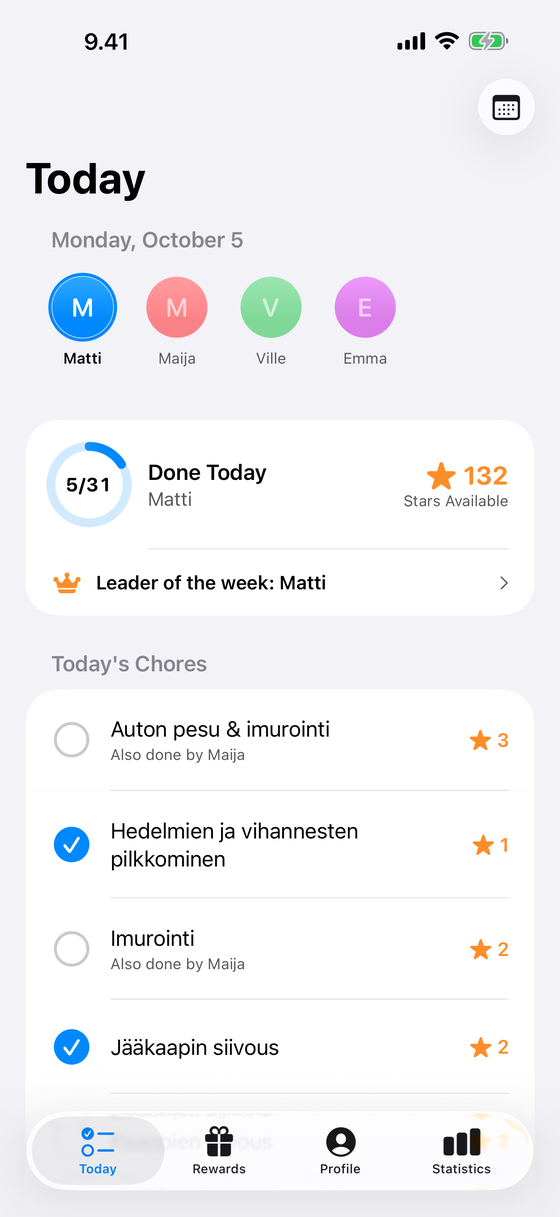
An iPhone app for sharing household chores in the family. Check off the day's chores with one tap, view the week at a glance, and earn stars for rewards the family agrees on.
Features
An adult sets up the family with Sign in with Apple, and other devices join with a code without needing their own account.
-
Day and week
The Today view shows the day's chores for one-tap completion. The weekly calendar shows who completed each chore and how many times.
-
Stars and rewards
Each chore is worth 1–5 stars, which can be redeemed for rewards agreed on by the family.
-
Statistics and weekly goal
Consecutive days build a streak, the weekly goal is shared by the family, and statistics show weekly progress.
-
Works offline
Completions made offline are queued on the device and synced automatically when the connection returns.
Privacy and access
The app contains no advertising, analytics, or third-party tracking, and data is stored in the EU. A new family can try the app free for 7 days, after which the full version is a one-time purchase for the whole family. Read the privacy policy.